Connect your tool
Data Bridge has two doors: a REST API for integrations and scripts, and an MCP server for AI tools. Both go through the same access policy: every call is checked against the caller's grants (data type × level × administration) and against the subscription, and every call is metered.
The base URLs, shown on the dashboard:
| Door | URL |
|---|---|
| REST API | https://apps.mvdw-software.com/exact/data-bridge/api/v1 |
| MCP server | https://apps.mvdw-software.com/exact/data-bridge/api/mcp |
| OpenAPI document | https://apps.mvdw-software.com/exact/data-bridge/api/v1/openapi.json |
REST API
Authentication
Every request carries the API key:
The key's grants decide what the call may do; the key's IP allowlist (when set) decides where it may come from.
Endpoints
| Endpoint | What it returns |
|---|---|
GET /resources |
the data types the gateway exposes: name, version, description, operations, available filters and sort keys. Call it first |
GET /divisions |
the administrations (division codes) this key may use |
GET /divisions/:division/:resource |
a list of normalized records |
GET /divisions/:division/:resource/:id |
one record, by its Exact id |
GET /openapi.json |
the OpenAPI 3 document |
Every answer is wrapped: { "data": … }.
Data types
| Resource | What it is | Operations |
|---|---|---|
accounts |
customers, suppliers and prospects (relations): name, code, contact details, status | list, get |
contacts |
contact persons of relations | list, get |
items |
products and services | list, get |
sales-invoices |
sales invoice headers: number, customer, dates, status, amounts | list, get |
gl-accounts |
general-ledger accounts (chart of accounts) | list, get |
The normalized fields are stable and readable (accountId, invoiceDate, isSupplier, …), not Exact's
OData field names. The GET /resources answer and the OpenAPI document
list them all, per data type.
Filters, sorting, limit
List endpoints take a small, strict query syntax; unknown parameters are rejected rather than guessed:
| Parameter | Meaning |
|---|---|
filter[name]=value |
equality |
filter[name][op]=value |
a comparison: startswith, ge, gt, le, lt (which ops a field has is in GET /resources) |
sort=field |
sort by one of the resource's sort keys |
limit=n |
at most n records, 1–1000 |
# customers whose name starts with "A", sorted by name, at most 20
curl -H "Authorization: Bearer exg_live_…" \
  "https://apps.mvdw-software.com/exact/data-bridge/api/v1/divisions/321654/accounts?filter[name][startswith]=A&sort=name&limit=20"

# invoices of one customer dated in October 2026
curl -H "Authorization: Bearer exg_live_…" \
  "https://apps.mvdw-software.com/exact/data-bridge/api/v1/divisions/321654/sales-invoices?filter[customerId]=d527…&filter[invoiceDate][ge]=2026-10-01&filter[invoiceDate][lt]=2026-11-01"
The available filters per data type:
| Resource | Filters |
|---|---|
accounts |
name (eq, startswith), code, email, vatNumber, isSupplier, modifiedAt (ge, gt, le, lt) |
contacts |
accountId, email, lastName (eq, startswith), modifiedAt |
items |
code (eq, startswith), isSalesItem, isStockItem, isTime, modifiedAt |
sales-invoices |
customerId, status (enum), invoiceDate (eq, ge, gt, le, lt), invoiceNumber (eq, ge, le), modifiedAt |
gl-accounts |
code (eq, startswith), modifiedAt |
Formats and linked data
Reads answer in the format of the Accept header. Without one you get JSON ({ "data": …, "meta": … }).
Accept |
Answer |
|---|---|
application/json (default) |
the normalized JSON |
application/ld+json |
JSON-LD with an inline @context |
text/turtle |
Turtle |
application/rdf+xml |
RDF/XML |
The linked-data formats describe the same records with standard vocabularies: schema.org
(schema:Organization, schema:Person, schema:Product, schema:Invoice, schema:Project, postal addresses and
amounts of money), Dublin Core terms (identifiers and dates) and
Hydra (a list is a hydra:Collection). Every record has an IRI
(…/divisions/<division>/<resource>/<id>) and links to related records (an invoice's customer, a contact's
worksFor) by IRI. Terms no standard vocabulary covers, such as isSupplier, use
https://mvdw-software.com/exact/data-bridge/vocab#. The JSON-LD context is inline, so nothing has to be fetched
to read it. Filters, sorting and grants work the same in every format; a media type the API cannot serve gets
406 resource.not_acceptable.
curl -H "Authorization: Bearer exg_live_…" -H "Accept: text/turtle" \
  "https://apps.mvdw-software.com/exact/data-bridge/api/v1/divisions/321654/accounts?limit=2"
Errors
Errors are { "error": { "code": …, "message": … } }:
| Status | Code | Meaning |
|---|---|---|
| 400 | resource.bad_parameter, resource.bad_limit |
a query parameter is repeated, unknown or out of range |
| 401 | credential.invalid |
the key is unknown, revoked or the wrong kind |
| 402 | billing.inactive |
the organization's subscription is not active |
| 403 | access.denied |
the key's grants do not cover this data type, level or administration |
| 403 | credential.ip_not_allowed |
the key has an IP allowlist and this address is not on it |
| 404 | exact.not_found |
the record does not exist in Exact |
| 429 | exact.rate_limited |
Exact's own limit; the answer carries Retry-After, wait and retry |
| 429 | exact.paused |
too many recent errors on that Exact endpoint; the call is paused for a while |
The API is rate limited per key (60 calls a minute) on top of Exact's own limits.
API keys
Keys live under Access → API keys:
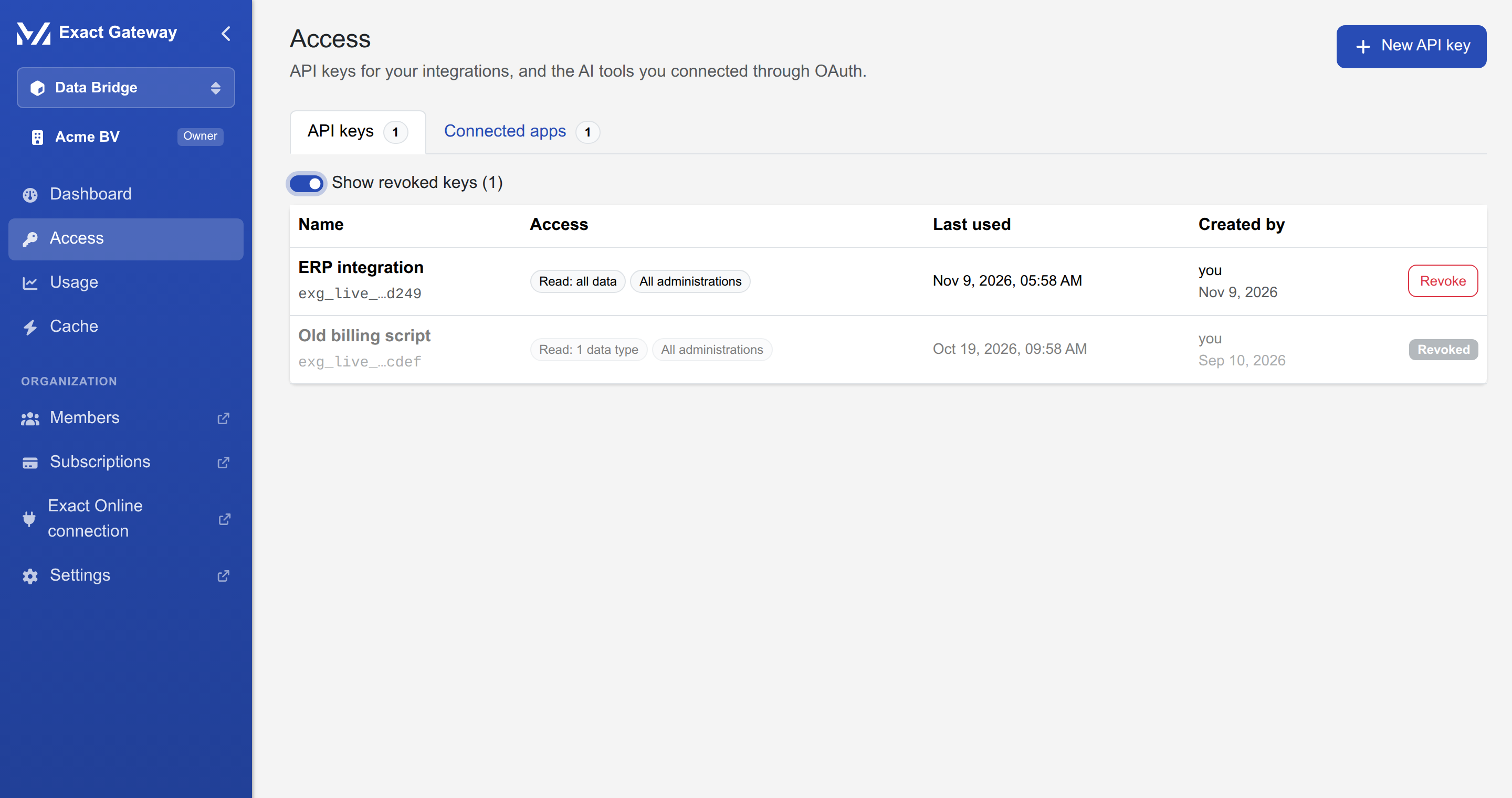
- Create: name, access preset (or the custom matrix), administrations, optional IP allowlist. The key is shown once.
- Revoke: a key can be revoked at any time; consumers using it stop working immediately. Revoked keys stay in the list (toggle Show revoked keys) until you know no consumer uses them.
- Grants are per key: two integrations in one organization can have completely different access: the
billing script reads only
sales-invoices, the AI assistant readsaccountsandcontacts.
The custom matrix groups the data types by domain (CRM, Sales, Logistics, Financial) and offers READ / WRITE / DELETE per type. WRITE and DELETE grants are stored already, but the API is read-only for now.
MCP for AI tools
The MCP server speaks the standard Model Context Protocol (Streamable HTTP). Its tools are generated from the data types and filtered by the caller's grants:
list_divisions, the administrations the caller may use;list_accounts,get_accounts,list_contacts, …, one list and one get tool per data type the caller may read;- every tool takes the same filters as the REST list endpoints (and the division).
An AI client sees exactly what its grants allow, nothing more, and every tool call is checked again at call time, so a revoked key or a demoted administrator stops working immediately.
Authentication
Two ways, choose per tool:
- API key: the client sends
Authorization: Bearer exg_live_…. Simplest; the key's grants apply. - OAuth 2.1: the client does a standard authorization-code flow; no key in the client at all. This is the recommended way for tools that support it (Claude, ChatGPT, …).
The server advertises itself for OAuth clients:
- discovery:
https://apps.mvdw-software.com/.well-known/oauth-authorization-server/exact/data-bridge/api/oauth - protected resource metadata:
https://apps.mvdw-software.com/.well-known/oauth-protected-resource/exact/data-bridge/api/mcp
The consent
With OAuth, the first connection opens a consent page for an organization owner or administrator (with two-factor authentication):
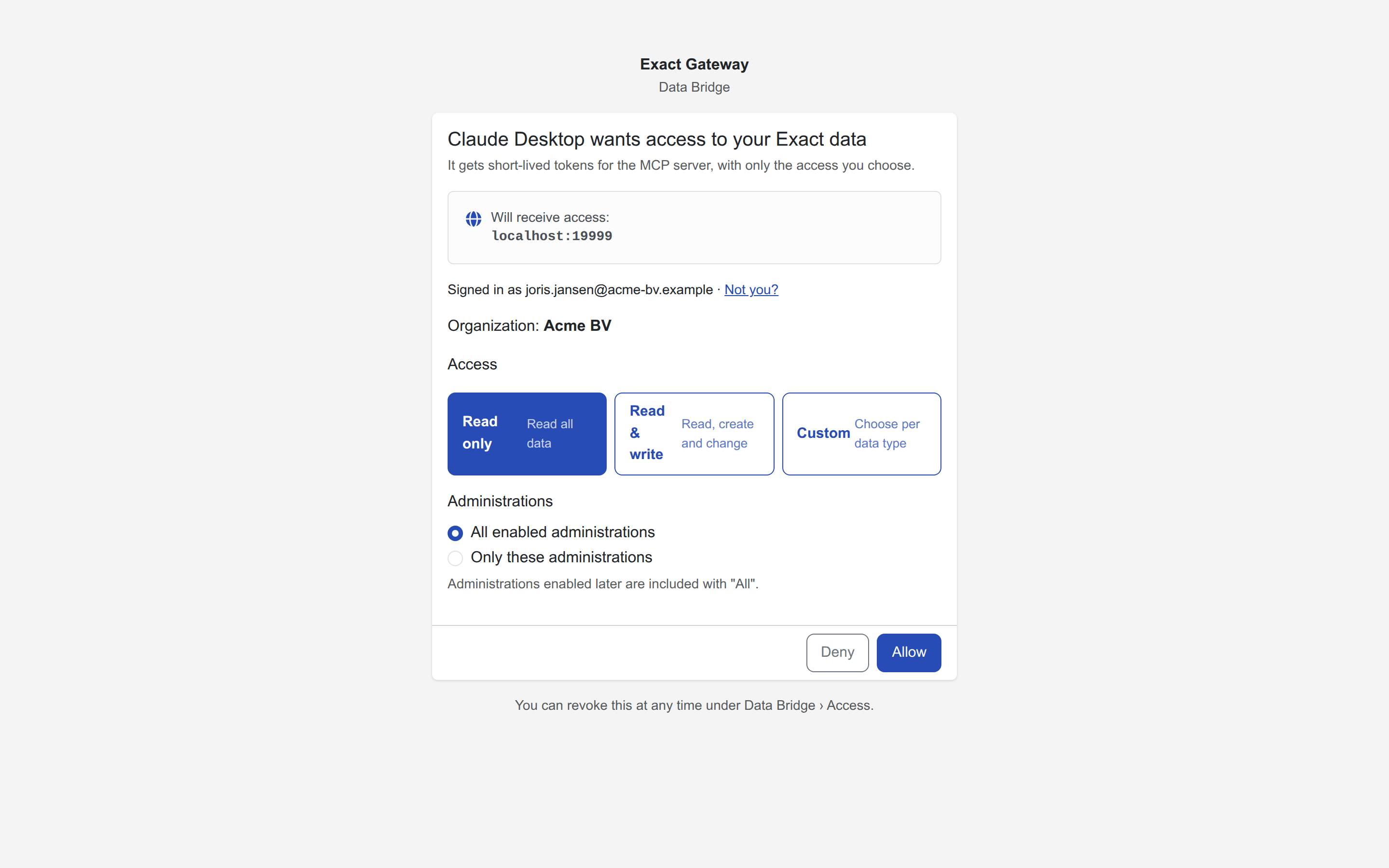
- the page names the client and its redirect host (will receive access), and who is signed in;
- the administrator chooses the organization (when there is more than one) and the access: Read only (default), Read & write or Custom (the full matrix);
- Allow connects the tool; Deny refuses it.
Every MCP call re-checks with the portal that the approving administrator is still an owner/administrator with two-factor enabled; if that is no longer the case, the tool stops. The connected app appears under Access → Connected apps, where it can be revoked at any time.
Per-tool setup
The dashboard's MCP tab has the server URL and the two common clients, ready to copy:
Claude Code:
claude mcp add --transport http exact-gateway https://apps.mvdw-software.com/exact/data-bridge/api/mcp
Claude Desktop (claude_desktop_config.json):
{
  "mcpServers": {
    "exact-gateway": {
      "command": "npx",
      "args": ["-y", "mcp-remote", "https://apps.mvdw-software.com/exact/data-bridge/api/mcp"]
    }
  }
}
Any other MCP client that speaks Streamable HTTP works the same way: point it at the server URL and either send the API key as a bearer token or complete the OAuth flow.
The cache
Under Cache the organization can opt in to a short-lived cache of list answers:
- off by default: every call goes to Exact;
- when on, repeated list calls within the TTL (up to 24 h) are answered from the cache instead of Exact;
- the cache is encrypted, per organization, and is purged automatically when the Exact connection is disconnected or needs re-authorization, so a stale copy can never cross organizations;
- Purge now clears it by hand (for example after a big import in Exact).
The dashboard shows whether the cache is on, and the Usage page shows the cache hit rate.