How the sync works
Once a project is linked, there is nothing to do: the sync runs on its own and the two sides follow each other. This page explains what is copied, when, and what happens when both sides change.
When a sync runs
| Trigger | What happens |
|---|---|
| the schedule (every 15 minutes by default, per project in Settings) | the project is read and its changes are written |
| Sync now on the project's row or page | the same, immediately; the row shows a spinner and a toast reports the result |
| a GitLab webhook | only when a webhook could be installed for the token: a change in GitLab triggers a run within seconds (the lightning icon on the project's row) |
A run reads in pages (100 issues at a time) and continues where it stopped, so a big first run takes several turns. While one run of a project is busy, another request for the same project simply waits.
What is copied
Time logs → draft hour lines
Every time log on an issue, a merge request or the project itself (within the label filter and the sync window) is summed per person, per issue and per day:
- one line is created or updated in Exact as a Draft, on the linked project, the administration and hour type from the link;
- the day is counted in the link's time zone, so a log at 01:00 on a flight from Tokyo lands on the right day;
- negative entries (a correction in GitLab) net out against the same person/issue/day; when the sum drops to zero or below, the line is deleted again, but only while it is still a Draft;
- a line that was deleted in Exact is never re-created;
- the first run takes everything from Sync time logged from; every later run covers the last 45 days, so old corrections still come through.
The lines are drafts on purpose: the person who books the hours in Exact can still adjust them, and nothing is submitted or posted by the sync.
Issues → WBS
When Issues to WBS is on:
- every in-scope issue becomes a WBS activity on the linked Exact project (milestones become deliverables, issues their children, with Milestones);
- the WBS structure is created from GitLab; WBS lines are never deleted in Exact, because hours may be booked on them, delete them there when a project is finished;
- an issue renamed in GitLab renames its WBS line on the next run.
Exact → GitLab: the status labels
When back-sync is on and the token can write:
| State of the lines in Exact | Label on the GitLab issue |
|---|---|
| any line rejected | exact::rejected, plus an internal note on the issue with the reason |
| every line final (approved) | exact::approved |
| otherwise (draft or submitted) | exact::submitted |
The label is replaced, not stacked: an issue that was exact::submitted becomes exact::approved when the
hours are all final. With a read-only token this step is skipped.
People
GitLab users are matched to Exact employees per GitLab connection and per administration:
- a GitLab user whose public e-mail equals an employee's business e-mail is matched automatically;
- everyone else appears under People as unmapped until an employee is chosen; while unmapped, the user's hours are skipped (they are not booked on someone else, and not lost: they are picked up once the user is mapped);
- Ignore deliberately excludes a user (a bot account, for example).
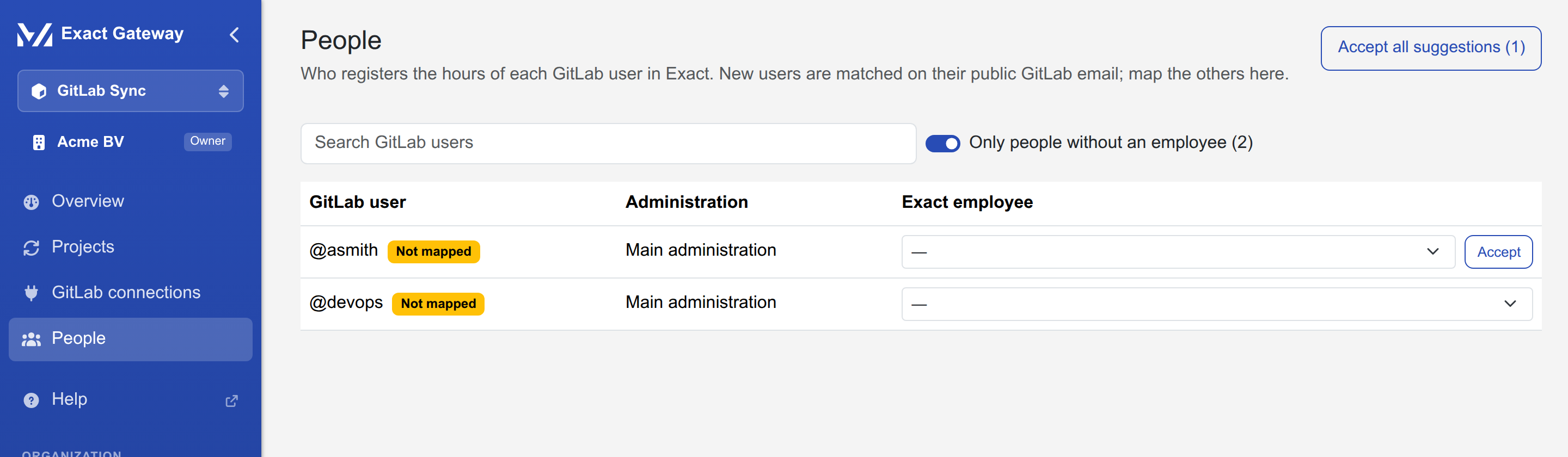
People
| What | Where |
|---|---|
| the list | People, one row per GitLab user, grouped per administration when there is more than one |
| search and unmapped only | above the list; unmapped only is on by default while unmapped users exist |
| a suggested employee | a GitLab name/e-mail close to an Exact employee is offered as Suggested; Accept confirms it, Accept all suggestions does it for everyone |
| choosing | the select per row saves immediately (a tick and a toast); Ignore excludes the user |
| from a run | a run summary that mentions unmapped users links straight to People filtered on them |
Conflicts
The sync only writes hour lines while they are Draft (or Rejected). When GitLab says a line should change but Exact already has it Approved (or the line was changed there in a way the sync may not touch), the difference is a conflict:
- the run stops at the line and records the difference (what GitLab has, what Exact has, and why it cannot be written);
- the project's status chip shows Conflicts n, and the Overview page counts them;
- on the project's page, the Conflicts tab lists each one in words, e.g. Approved in Exact, can't be changed: GitLab has 8.0 h on 12 Oct, Exact has 6.0 h;
- resolve it in Exact (change or delete the approved line, or adjust the time log in GitLab): the next run re-reads both sides and the conflict clears when they agree again.
The sync never silently overwrites an approved line, and never books an hour that a person removed.
What is not synced
- time logs outside the sync window on the first run (older than Sync time logged from);
- hours of unmapped GitLab users (skipped, and listed under People);
- anything in Exact besides the linked project's time lines and WBS (no posting, no invoicing, no projects created outside the wizard);
- issues outside the label filter, and closed issues on the first run (issues that close later are still updated while the project is linked).